I recently discovered Codex on mobile, and it is one of the nicest upgrades I’ve made. It was making my Mac available from literally anywhere.
Now I can be out, open my phone, start a Codex task and continue exactly where I left off. Here’s the basic setup.
1. Keep the Mac awake
First problem: your Mac can’t sleep. Use the original caffeinate command or use Amphetamine so the Mac never goes to sleep. I like better interfaces so I opt for Amphetamine. And while using Amphetamine Power Protect, it lets you close the lid while the machine keeps running.
2. Install Tailscale
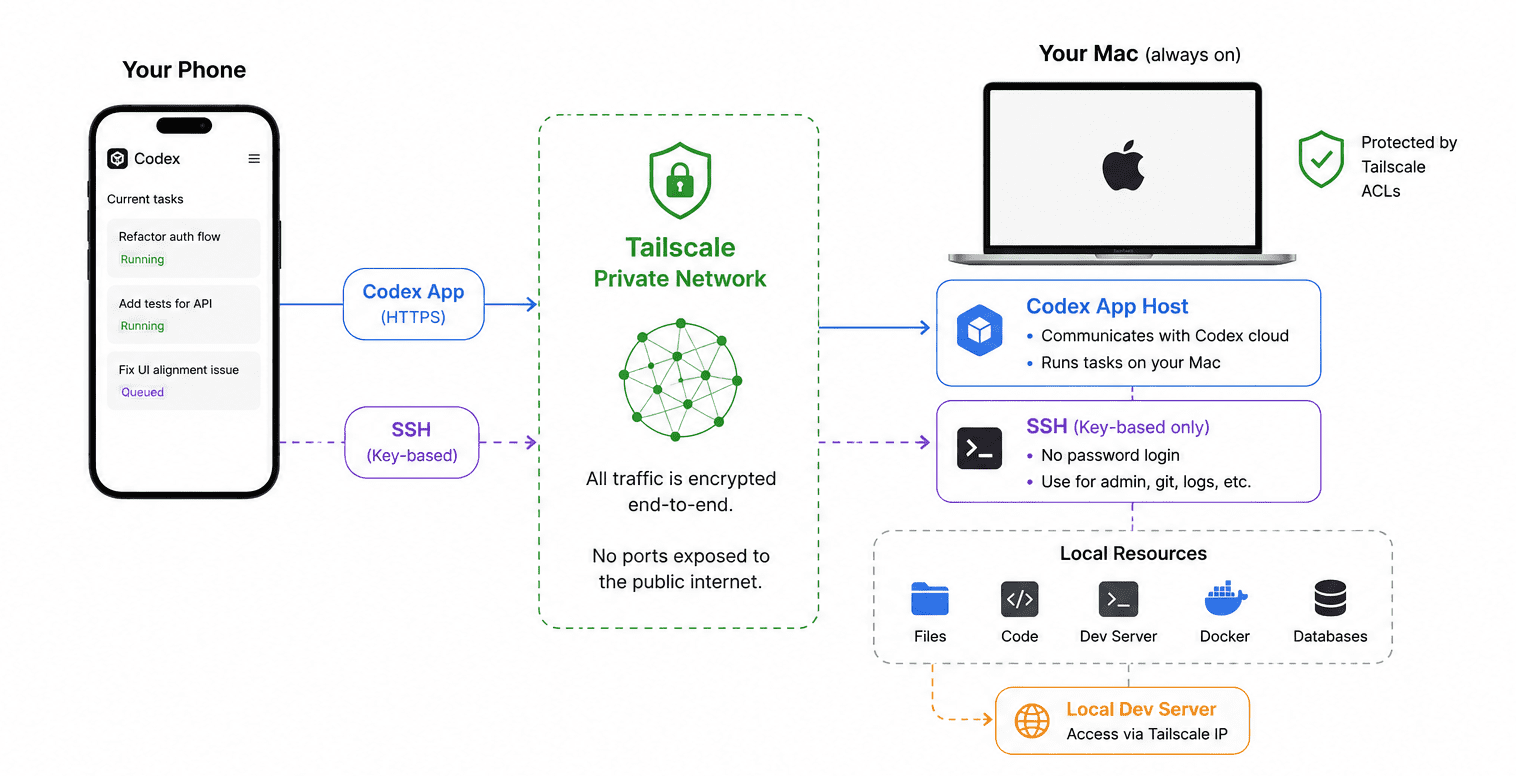
Next, install Tailscale. It creates a private network between your devices, so your phone can securely reach your Mac from anywhere. No exposing your home IP. Everything just works.
3. Secure SSH properly
Generate an SSH key. Copy the public key to your Mac. Then disable password authentication completely. Now only devices with your SSH key can connect. Codex remote feature communicates with the Codex app host directly, so you don’t use SSH to start Codex tasks. However, it is still invaluable if you need to do anything outside the Codex interface
Bonus: Your local dev server works everywhere
Instead of opening localhost, just open the Tailscale IP from your phone. Now you’re viewing your local website directly on your phone without deploying anything. It’s perfect for checking mobile layouts and responsive behaviour.
A few thoughts after using Codex on phone
Overall, the mobile experience is genuinely impressive. Life has all been about productivitymaxxing so this becomes useful when you’re commuting or standing in queues or anything boring. That said, there are still a few rough edges.
Reviewing larger diffs currently feels much more cumbersome than it needs to be. A proper full-screen review mode and a way to browse changes file-by-file would be useful On my iPhone 14 Plus, longer conversations become noticeably sluggish. Sometimes after force quitting and reopening the app, I still end up waiting several seconds between key presses while typing. This isn’t just for mobile but why can’t I delete conversations easily? I can only archive and there’s no real Delete button in the UI.
Don’t forget security
The idea of leaving your Mac online 24/7 sounds terrifying until you realize it doesn’t have to be exposed to the internet at all. Tailscale puts your devices on a private network, so your Mac isn’t sitting on the public internet waiting for someone to find an open port. For SSH, disable password authentication and only allow key-based logins. Even if someone somehow discovers your machine, they can’t just brute-force a password that doesn’t exist. The only service I intentionally expose is the Codex app host, and even that is only reachable from my trusted devices through Tailscale.
It’s a surprisingly simple setup, but it’s changed how I work. Instead of waiting until I’m back at my desk, I can kick off work whenever an idea comes to mind and by the time I get home, there’s usually something waiting for me.